Materials and stock
Requests move through purchasing and receipt. Applicable goods enter stock through an explicit inventory entry.
Recorded purchases → cost center
Built for companies that work by project
Built from real project operations at AUROM, SARA connects sales, operations, and administration. Manage turnkey delivery or hourly services with travel, with records connected to the same project.
Need credentials? Email contact@sara-app.net to request access. The demo resets periodically; use test data.
The problem
The quote is in a spreadsheet. The purchase request is in an email. Hours live in another record. To understand what happened, someone has to put it all together. SARA connects those processes through shared records, stages, permissions, and history.
Connected operation
Follow the commercial handoff, material purchasing, and financial picture through connected workflows. The available steps depend on the modules and required packages selected for your company.
Three parallel records from the project
Requests move through purchasing and receipt. Applicable goods enter stock through an explicit inventory entry.
Recorded purchases → cost centerHours, logistics, and expenses are recorded against the project as work progresses.
Recorded activity → cost centerCustomer PO records track invoices and collected payments.
Potential and received income → cost centerThese are connected paths available with the required module scope, not a mandatory sequence in every subscription. The arrows describe relationships and handoffs; they do not imply every step is automatic.
Turnkey projects
Each story answers a practical question using records connected to the same project.
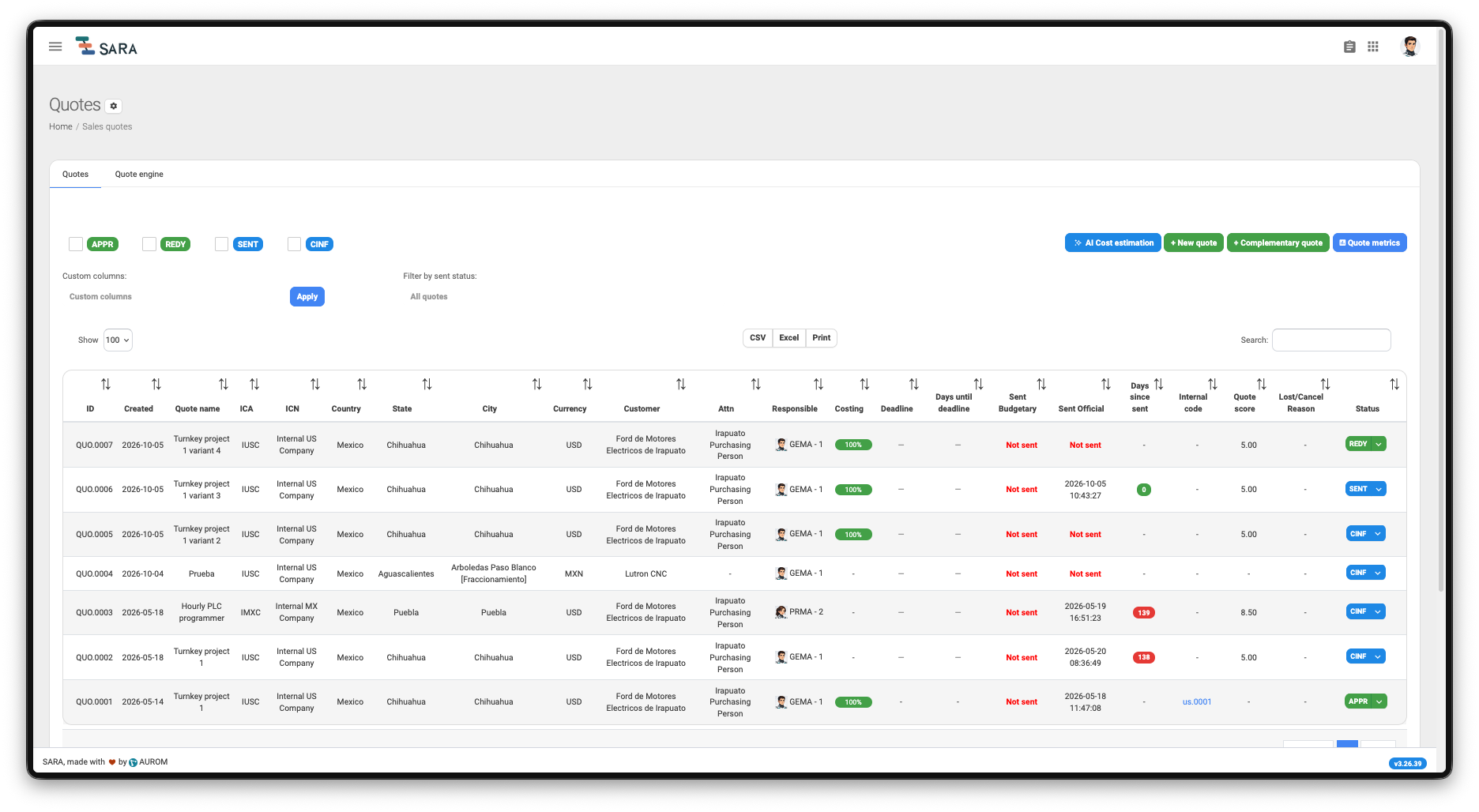
How does what you sell become what the team executes?
Build the quote with its cost structure, record the customer's acceptance, and continue the work in the linked project. Quote Engine supports the quoting process; standard accepted quotes create projects, while complementary quotes can update an existing project's budget.
Commercial context stays linked to the project record.
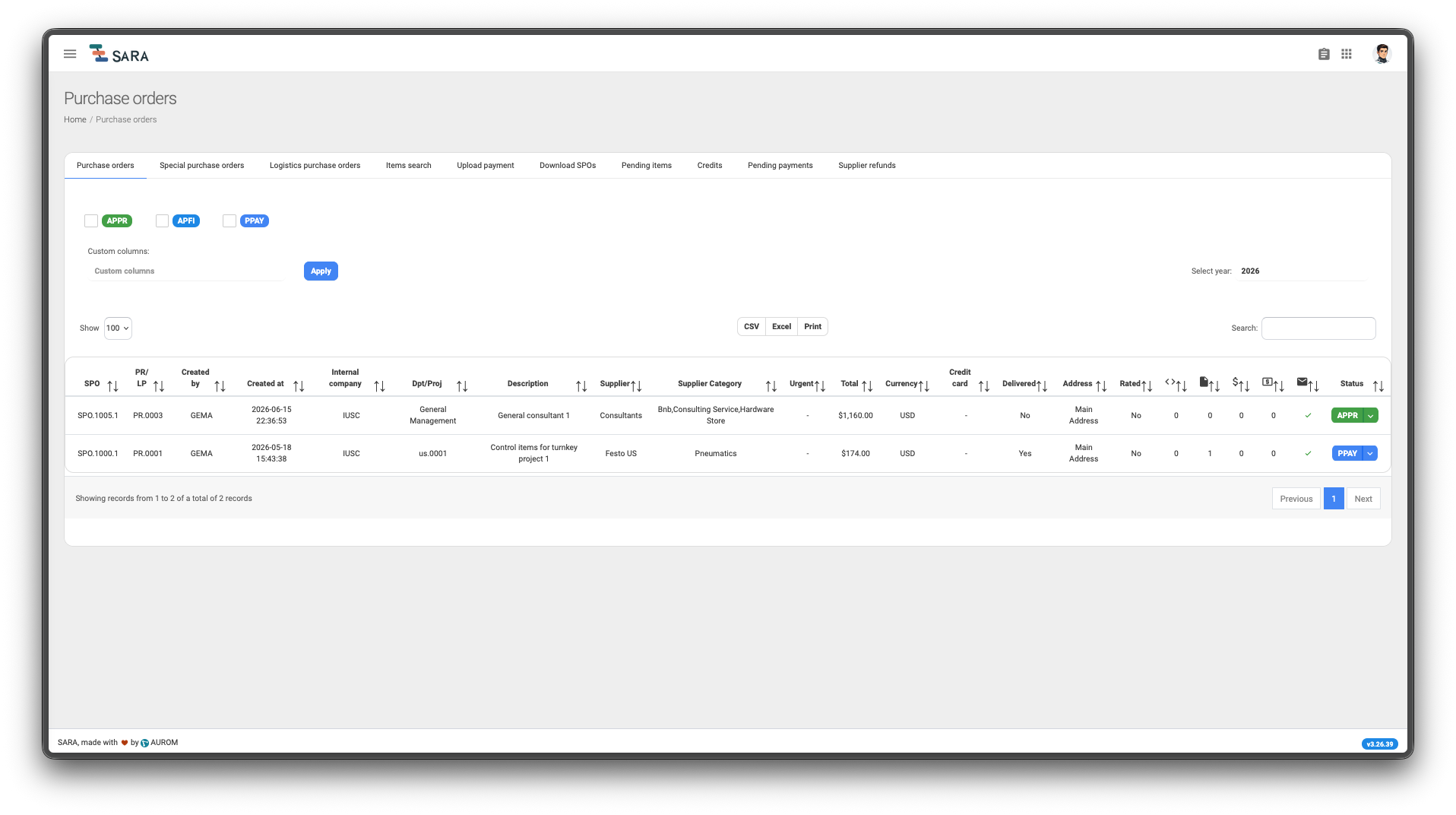
What happened to the material your team requested?
Follow requested materials through purchasing and receipt, then record applicable goods in their warehouse location. Inventory entry is an explicit action after receipt; it does not apply to every service purchase.
Trace requested goods through receipt and applicable inventory entry.
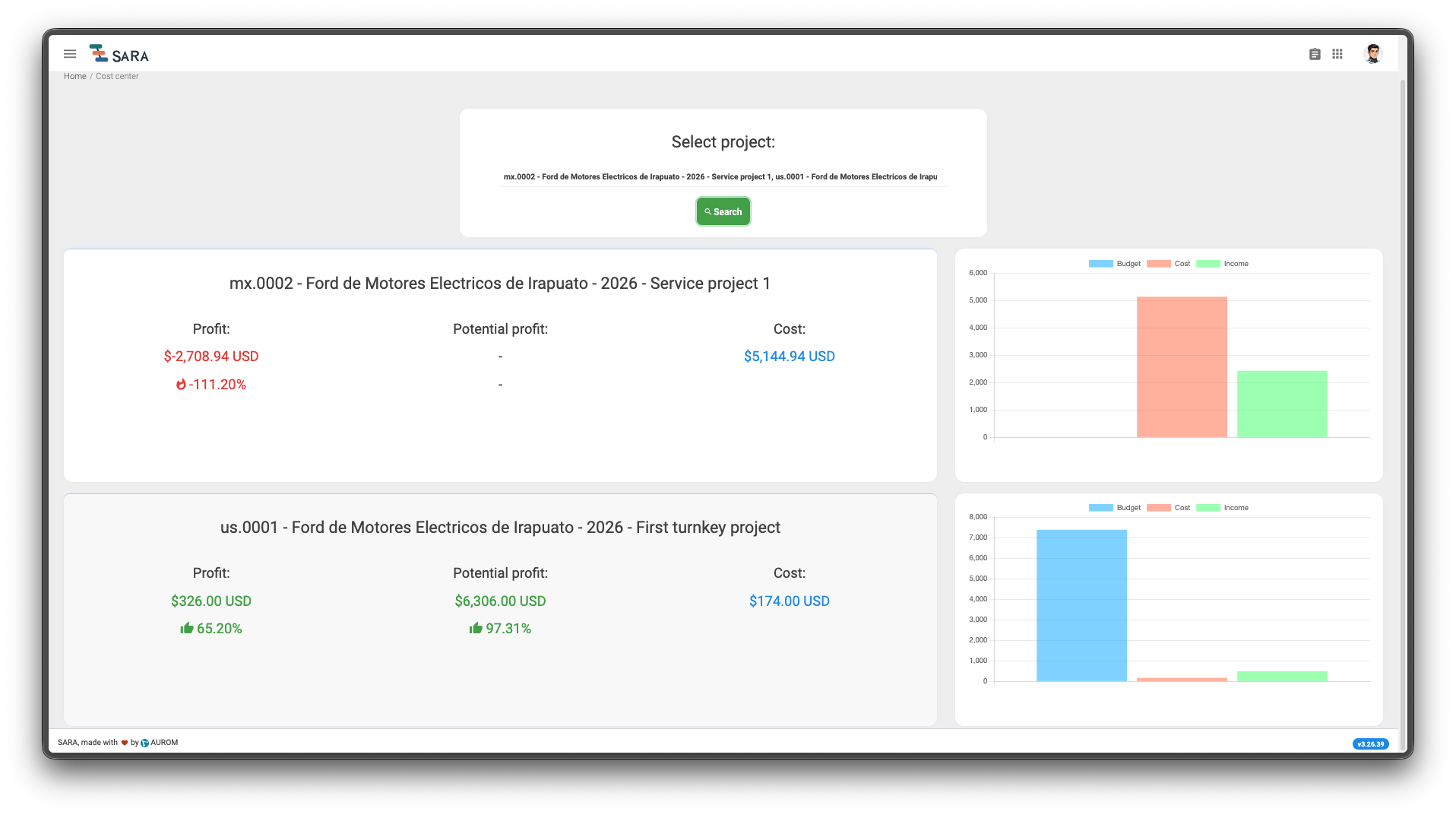
What has the project cost, and what has actually been collected?
Review purchases, hours, logistics, and recorded expenses alongside customer-order income and collected payments. The cost center brings these records together when you look up the project; you do not have to wait for project closure.
See recorded costs beside potential income and what has been received.
Hourly services with travel
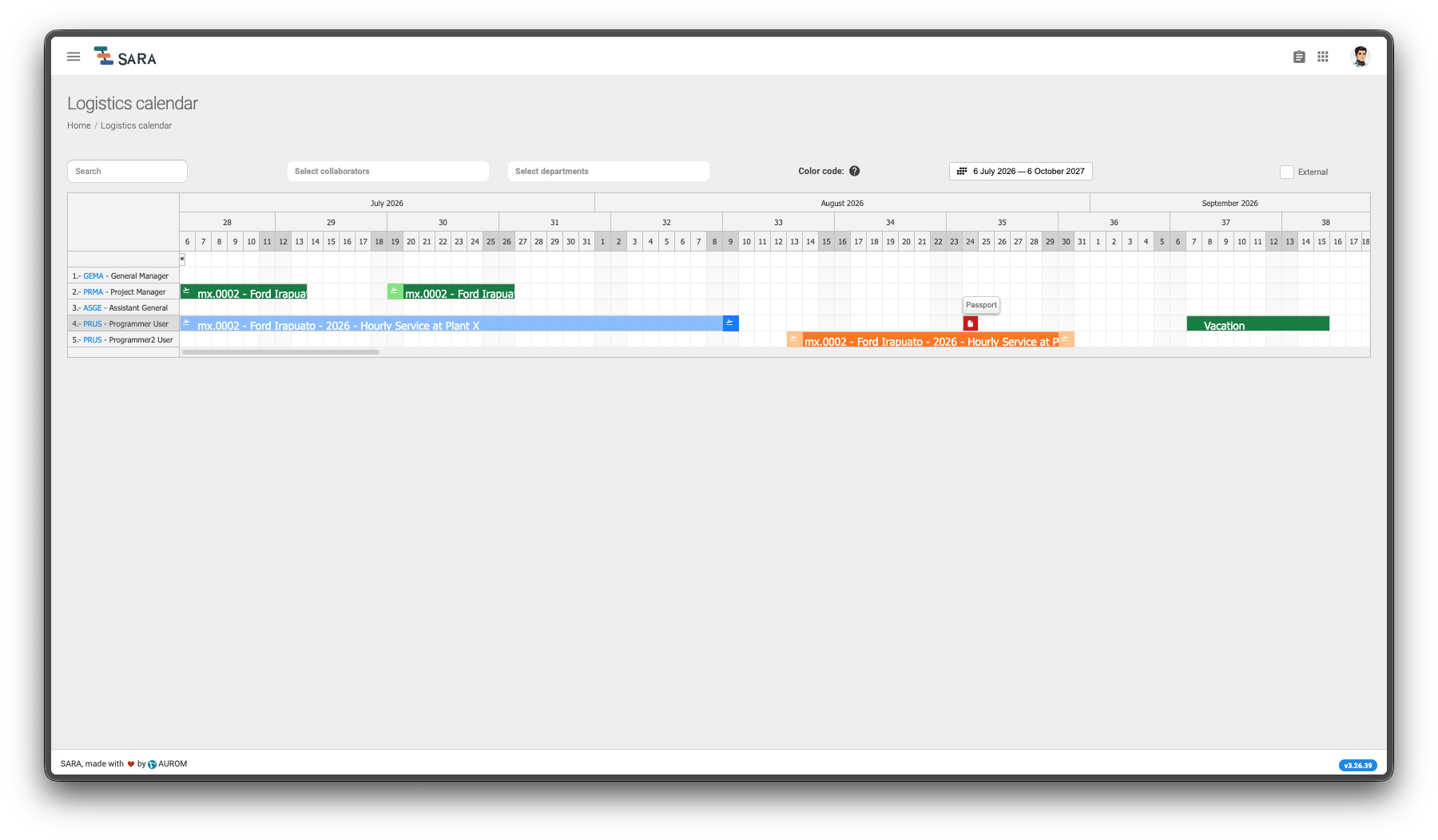
When delivery means sending people to a customer site, the project includes more than work hours. Bring commercial commitments, travel planning, bookings, employee instructions, and financial records into one connected operation.
See employees and their scheduled assignments together on the Logistics Calendar. Identify open periods when planning who can travel next, and spot document expiry markers on each employee’s row—from visas and passports to driving licences and other documents configured with expiry dates. Availability planning is based on the events recorded in the calendar.
Prepare the quote, receive the customer purchase order, and create the project that connects the work ahead.
Schedule the assignment with origins, destinations, and dates. Identify flights, hotel stays, and vehicle rentals needed for the trip.
Manage travel purchases, supplier orders, and booking confirmations. Review required employee documents and expiry dates, such as passports and visas.
Email the employee a to-do list with the itinerary and attached tickets, reservations, and supporting booking files.
The employee travels, performs the work, and records project hours. Review and approve timesheets to support the billing workflow.
Use approved hours in the agreed billing process, record customer invoices and payments, and review income and recorded project costs in the cost center.
Travel purchases and expenses contribute to project costs. Approved service hours support billing. The cost center brings recorded income and costs together.
The available steps depend on the selected modules and their dependencies. Billing and accounting integrations are configured for your operation; recording hours does not automatically issue an invoice.
Project task management
For turnkey delivery and hourly services alike, SARA Kanban brings project tasks, owners, dates, and supporting files into a shared workspace. See what needs attention and follow the work through your team's own stages.
Use the board to follow tasks through your team’s stages, with owners and dates connected to each card. Switch to the calendar for a visual timeline of dated tasks, or open To do to focus on your assigned work.
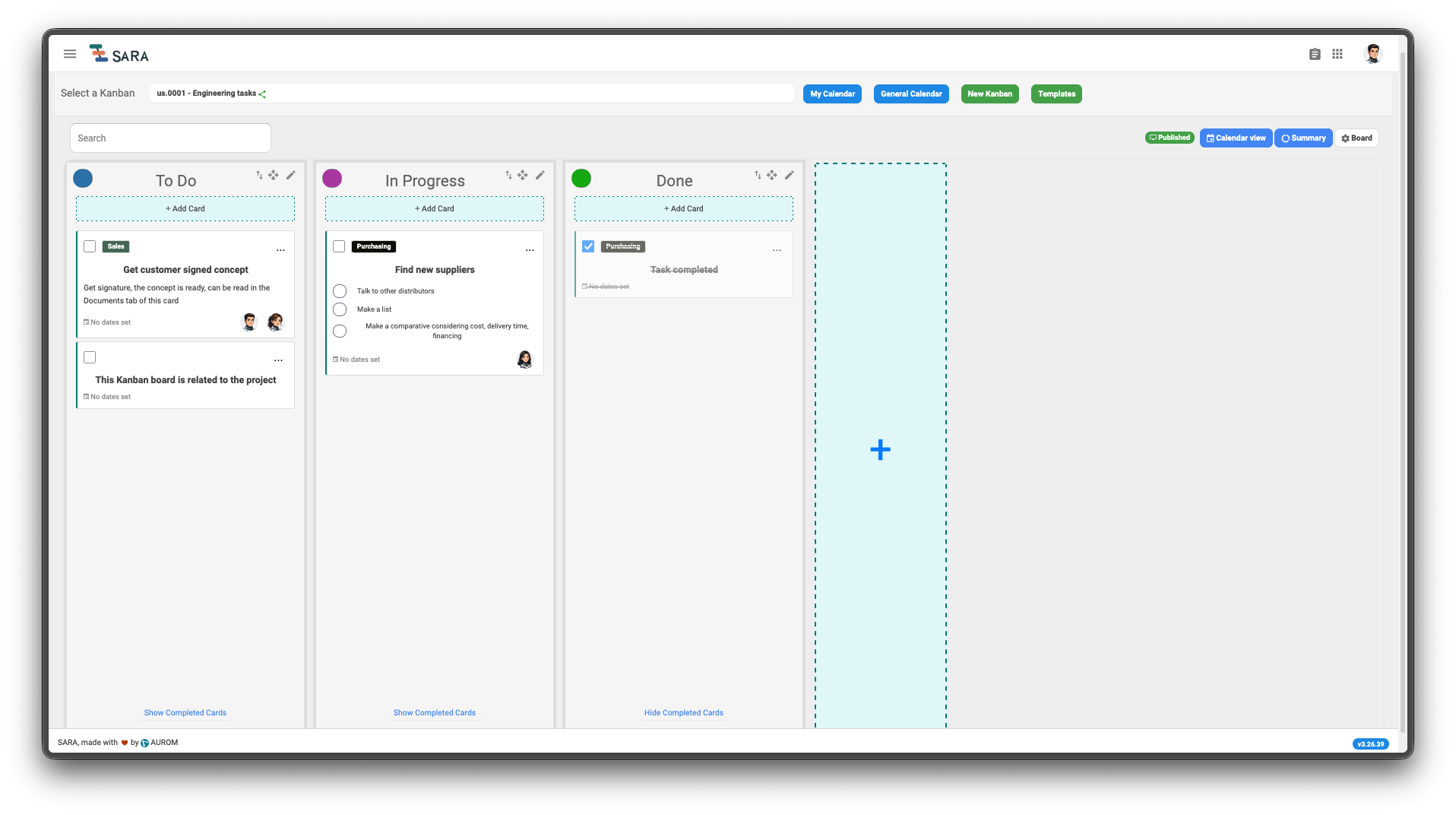
Create a project board with task cards and configurable columns. Assign responsible team members, set priorities and dates, and break work into checklists.
Project-linked tasksAttach files, add notes, and review the card's activity log. Mark tasks complete and check the recorded completion action, including who performed it and when.
Files, notes, and historyView dated tasks on a timeline-style calendar. Review one board, your assigned work across boards, or the general calendar where your permissions allow.
Board and personal calendarsOpen your assigned tasks from the shared To do panel while working elsewhere in SARA. Send supported assignment notifications through WhatsApp when the integration is configured.
To do and WhatsApp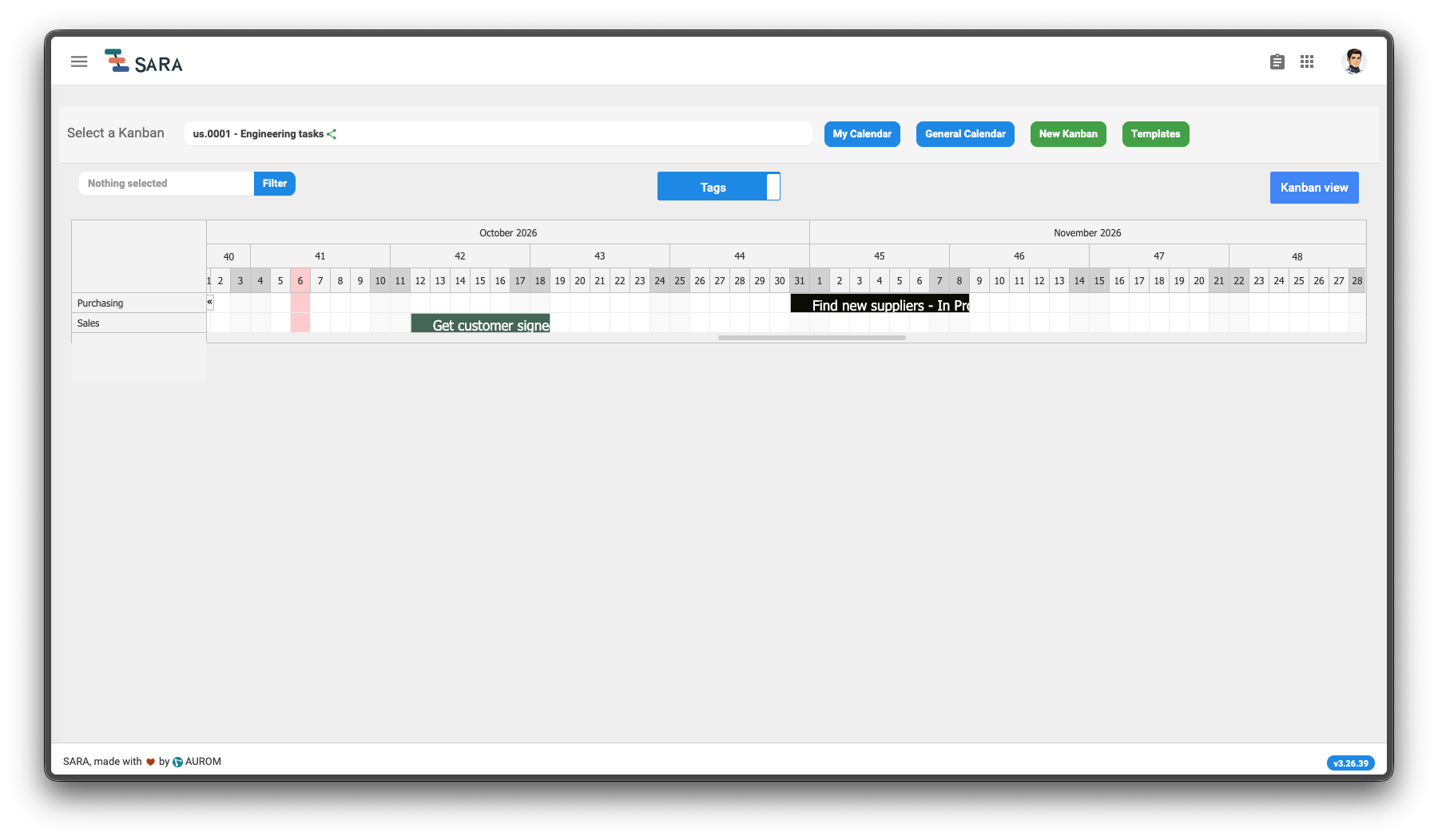
Boards and actions follow your module scope and permissions. Calendar views show tasks with dates. Kanban email notifications are currently disabled; other SARA workflows support email notifications.
Connected teams
Important workflow events can reach your team through email and WhatsApp, so assignments and decisions can move beyond the screen.

Share operational details, travel instructions, and relevant summaries or notifications with the people involved.

Notify responsible team members about supported time-sensitive events, such as new work and rejections.
Events, recipients, and channels depend on the enabled modules, permissions, and notification configuration.
Modular adoption
Start with the SARA modules that address gaps in your current operation. You can purchase and use the modules you need; some require a package of dependent modules. We review your workflows and existing systems to define a supported scope before implementation.
Complement your current tools where SARA is needed, with module dependencies and data handoffs agreed for your company.
By role
Review your projects using recorded costs and income.
Follow requests and costs within your project's context.
See each request's stage and associated purchase order.
Organize quote progression and retain offer versions.
Implementation
AUROM handles implementation and the data import agreed with your team, including personnel and projects where applicable. We assess your source files, historical records, and data preparation needs case by case, so you can continue operating in SARA after the import.
AUROM manages your cloud-hosted instance. Your subscription includes access to the user manual and personalized ongoing support.
Subscription
Monthly pricing can be based on total personnel, account count, or an agreed fixed fee. We define the modules and implementation scope with your company before preparing a proposal.
Talk to us about the early-customer program.
Origin
SARA grew from the need to connect quoting, project execution, purchasing, and costs within AUROM's operation.
A product by
FAQ
No. You can purchase and use the modules you need. Some modules require a package because of dependencies; we define a supported combination with your company.
Yes. We can scope SARA around operational gaps you want to address. Any data exchange or integration with existing tools must be assessed separately; automatic synchronization is not implied.
SARA is designed for companies coordinating project-based operations across sales, project teams, purchasing, and administration.
Yes. Implementation and agreed data import are included. We review source files and historical coverage with each company before defining the import scope.
We offer options based on total personnel, account count, or an agreed fixed fee. Your proposal defines the modules, scope, and monthly price.
AUROM manages your cloud-hosted instance. The subscription includes the user manual and personalized support throughout the subscription. Service arrangements are agreed with your company.
No. AUROM manages your cloud-hosted instance. Sign in through a compatible web browser on Windows, macOS, Linux, tablets, or phones. You need an internet connection and your account credentials; there is no local SARA installation.
Yes. Email contact@sara-app.net to request demo access or a guided workflow demonstration. Our team will send the login credentials by email. Credentials are shared on request rather than published openly to limit automated access. The demo resets periodically; use test data.
Your next step
Tell us how your company runs projects. Request demo access or a guided walkthrough, and we'll help you explore the workflows that fit your operation.
Email contact@sara-app.net. Our team will send your demo credentials by email. Access details are shared on request to limit automated access.